
You must have noticed a trend by now on your LinkedIn feed.
It’s when a LinkedIn user instead of copying and pasting the URL they want to share, they paste the link on the first comment below the post.
The reason behind this is this: Higher reach (we’ll see later why). But does a higher reach make up for a harder-to-find link / Call to Action?
Let’s get right into it!
Hypothesis
Pasting a link in comment results in less clicks.
My hypothesis was that posting a link in the comment makes it so difficult for everyone that the potential higher reach would not be enough.
Experiment Setup
To test this theory, we made observations of different variables.
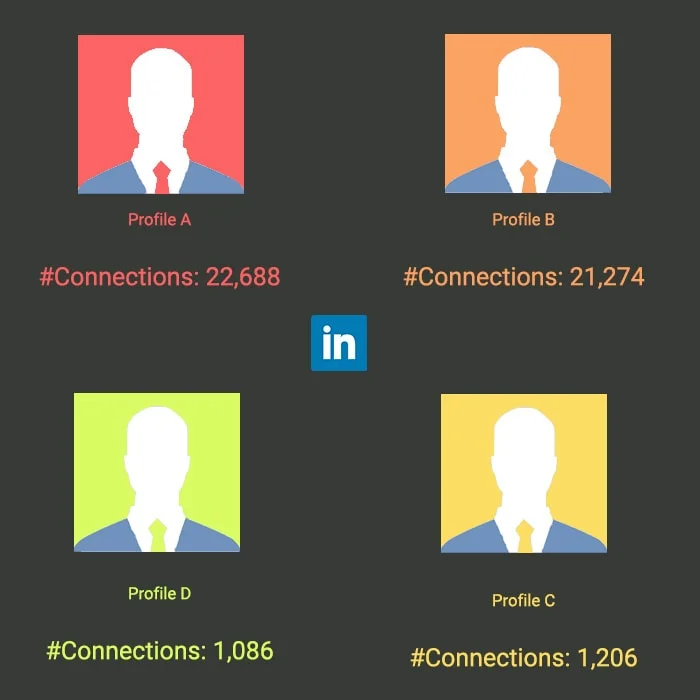
To eliminate the number of connections factor, we used 4 LinkedIn accounts. Two of these accounts, Profiles C&D, had few connections (a bit over 1k), while the other two accounts, Profiles A&B, had more connections – over 20k connections each.
We ran our test for 8 weeks. With one post per week, that meant 8 posts per profile – 32 posts in total.
To eliminate other factors such as time, date and gender, the profiles were male, working for the same growth hacking agency, posting every Friday at noon, with the same body text and image.
In addition, Profiles A&C would post the ‘Link in Post’ format, henceforth LiP, the first time. The second time, they would post the ‘Link in Comment’ format, henceforth LiC. The third time they would post in LiP format etc.
Likewise, profiles B&D would post LiP and LiC posts alternatively, starting with the LiP format.
So the planning looked like this:

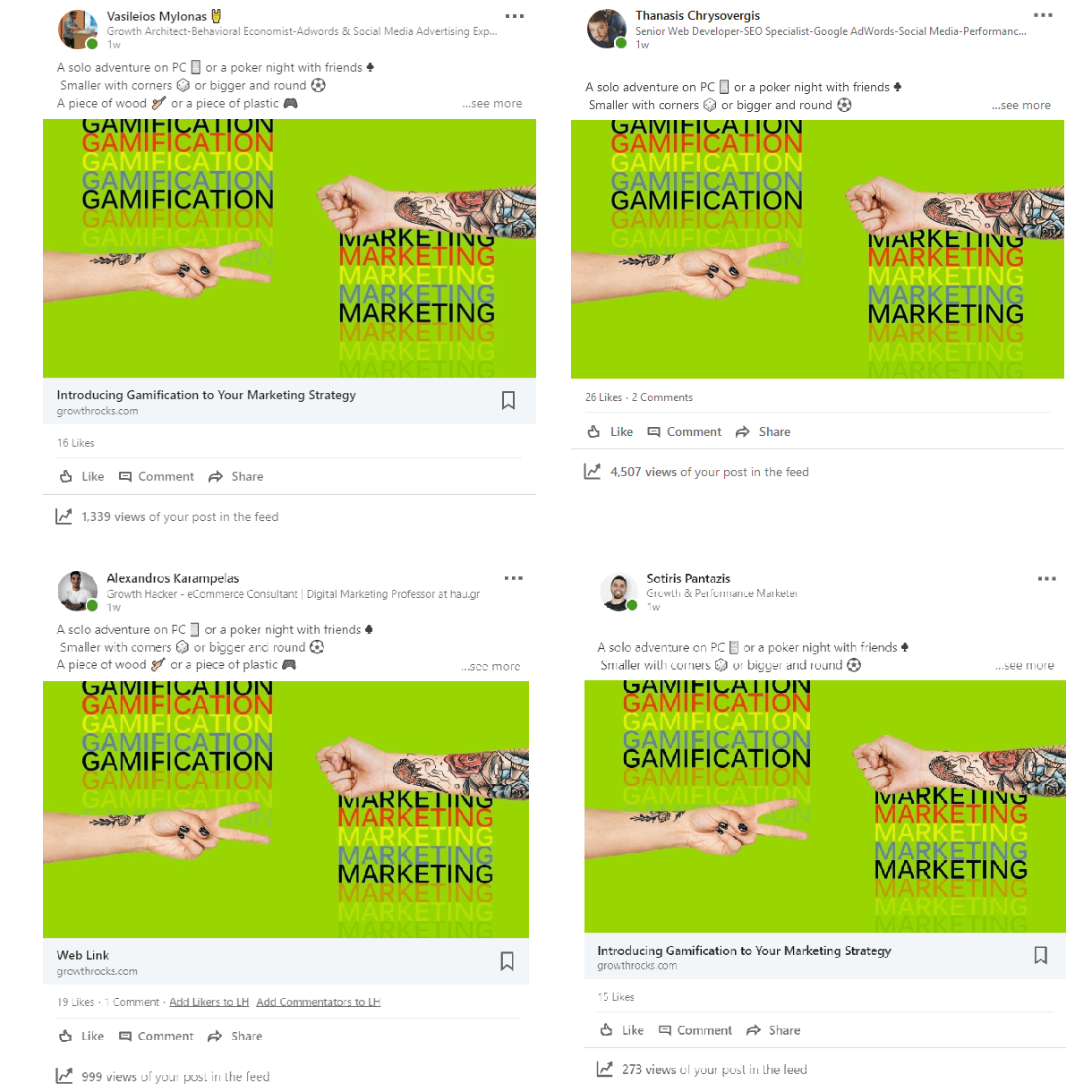
For example here are the the posts of week#3. During that week, Profiles A&C (Vasileios & Sotiris) made LiP post, while Profiles B&D (Thanasis & Alexandros) made a LiC post.
The Experiment
To test our hypothesis, “Pasting a link in comment results in fewer clicks,” we had to measure all these Clicks.
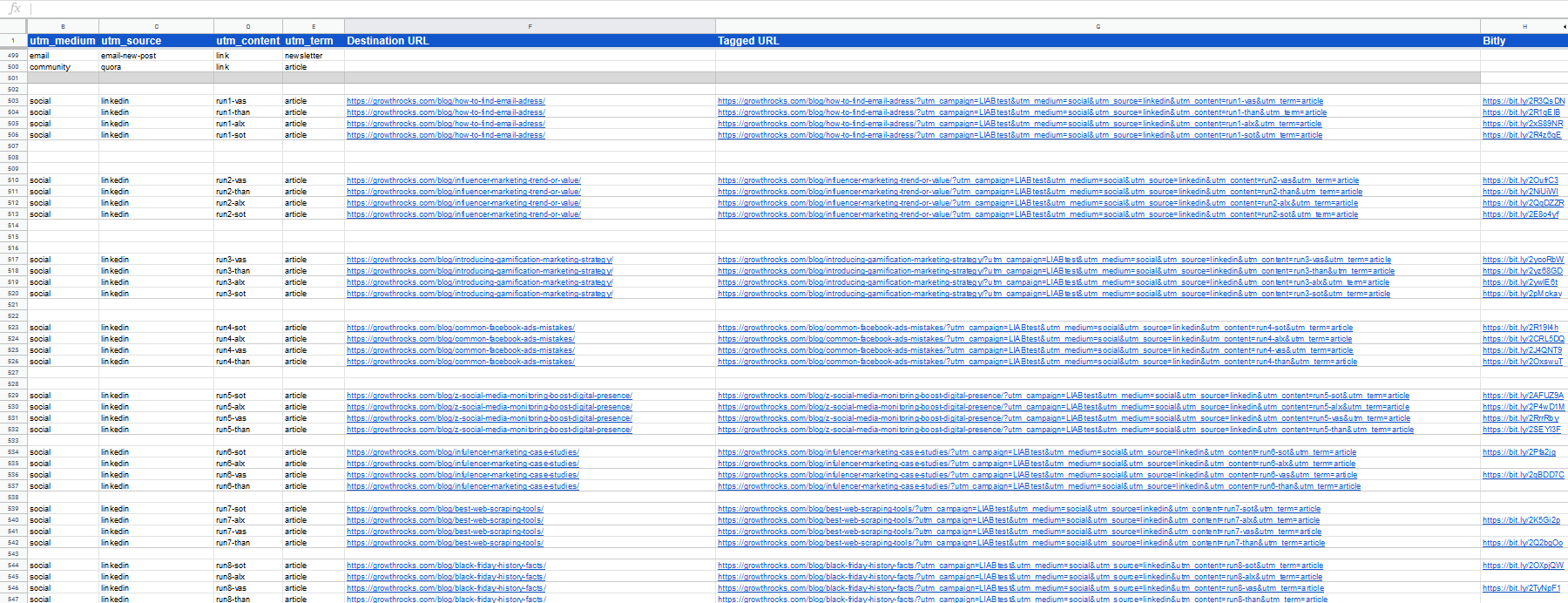
To keep track of the number of clicks, we used some good ol’ UTM’s.
Here’s how the UTM Google Sheet looked like by the end of the experiment.
To gain some additional knowledge, we also measured Reach.
To track Reach, each profile owner was making a print screen one week after each post. Like we did with clicks when they were also measured after 1 week.
FYI, the Reach number on LinkedIn is erased automatically after 2 months. This data won’t stay forever.
If you are looking to keep track of this particular metric, you need to do so manually and on-time. Notice how I can see the reach for my 1-month old blog post about The Top Digital Marketing Articles. However, this is not the case for my 2-months post about an Email Outreach Step-by-Step Guide.
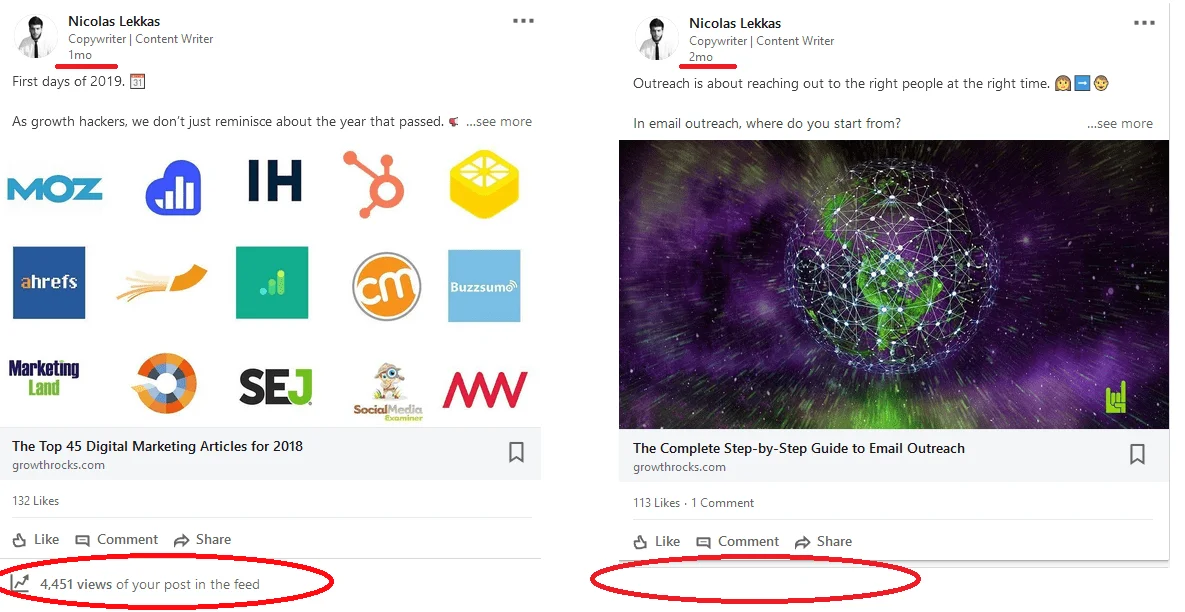
So for those of you who had noticed that they couldn’t see the views count on all of their posts: now you know.
The Results
8 weeks passed, and I finally started bringing all those numbers together.
This is what the numbers look like on a single chart, for all weeks, for all profiles.

To draw some conclusions, let’s brake it down a bit.
Reach
Ιt was common knowledge that LiC format has the blessings of the LinkedIn algorithm. It doesn’t include an immediate call-to-action which will bring the user out of the social media platform, thus the algorithm pushes it more. How much more though?
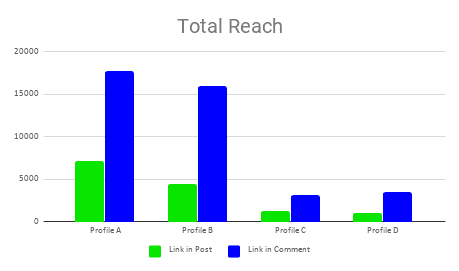
The average reach for all format LiP posts was 3,514.
For LiC, it was 10,095.
LiC equals to 2.9X times more reach!
But what about the clicks, which is what about we are really here for?
Clicks
Now, the real deal.
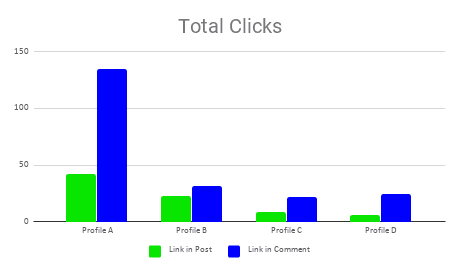
It turns out that LiP format post would be clicked about 20 times on average, whereas posts with LiC format was clicked 53,5 on average.
Do the math, and you will find out that LiC format was clicked 2.7X times more.
We have a winner: A link in the comment is clicked more.
Click-Through-Rate
CTR is the clicks : reach ratio.
Sure, when we examine reach and clicks as separate numbers, reach A is smaller than reach B and so are the clicks. What is the ratio number, though?
Which format is actually more clickable?
Don’t hold your breath – this was pretty much a tie.
CTR had no significant difference. Here are the Total CTR’s for each profile:
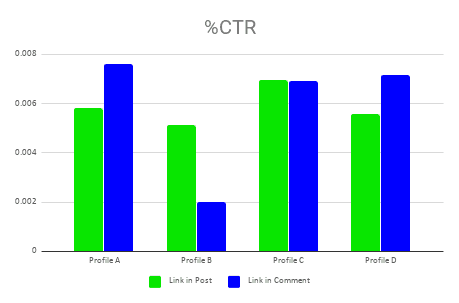
Which made me wonder. How is a direct URL with a large clickable image not more convincing than a sentence that reads “Link on the first comment,” where you have to scroll a bit more and then click a blue text with the link? The human factor is so unpredictable after all.
For the record, LiP CTR was 0.0588% while LiC CTR was 0.592% on average.
Experiment Rerun [2021]
The experiment was initially conducted in late 2018 and published in February 2019.
So, more than two years later, we asked ourselves: Do our findings still hold true?
What better way to answer our questions with another experiment!
This time, however, the experiment’s setting was a bit different. The experiment ran for 8 weeks as well but for 2 profiles: GrowthRocks company page and my personal profile.
As with the first run, the profiles posted LiP and LiC posts alternatively. So here are our findings.
Reach

LiC equals to 1.8X times more reach.
Clicks
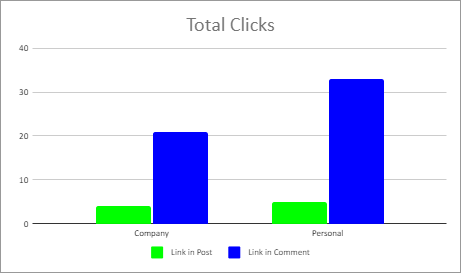
The LiC format was clicked 6X times more.
Click-Through-Rate
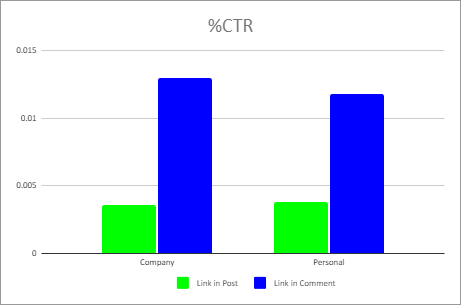
In contrast to 2018’s results, there is a statistical significance regarding %CTR.
More precisely, the LiC format appeared to have a higher click-through-rate percentage – almost 4X times more, to be exact.
Conclusion [2021 Update]
Opinions speak, but data shout.
It is proved that posting any link in the form of a comment below your post results in:
- Better Reach
- More Clicks
- A higher CTR
Mathematically, for maximum reach and clicks, you should post a link in a comment.
So there you have it. You now know the best way to make a LinkedIn post for maximum reach and clicks in 2021.

I write for GrowthRocks, one of the top growth hacking agencies. For some mysterious reason, I write on the internet yet I’m not a vegan, I don’t do yoga and I don’t drink smoothies.